AI Blog Content Analytics: Turn Data Into Traffic Wins
Learn how to track, interpret, and act on blog performance metrics so every AI-generated article compounds organic growth.

Learn how to track, interpret, and act on blog performance metrics so every AI-generated article compounds organic growth.
Pranjal Jain
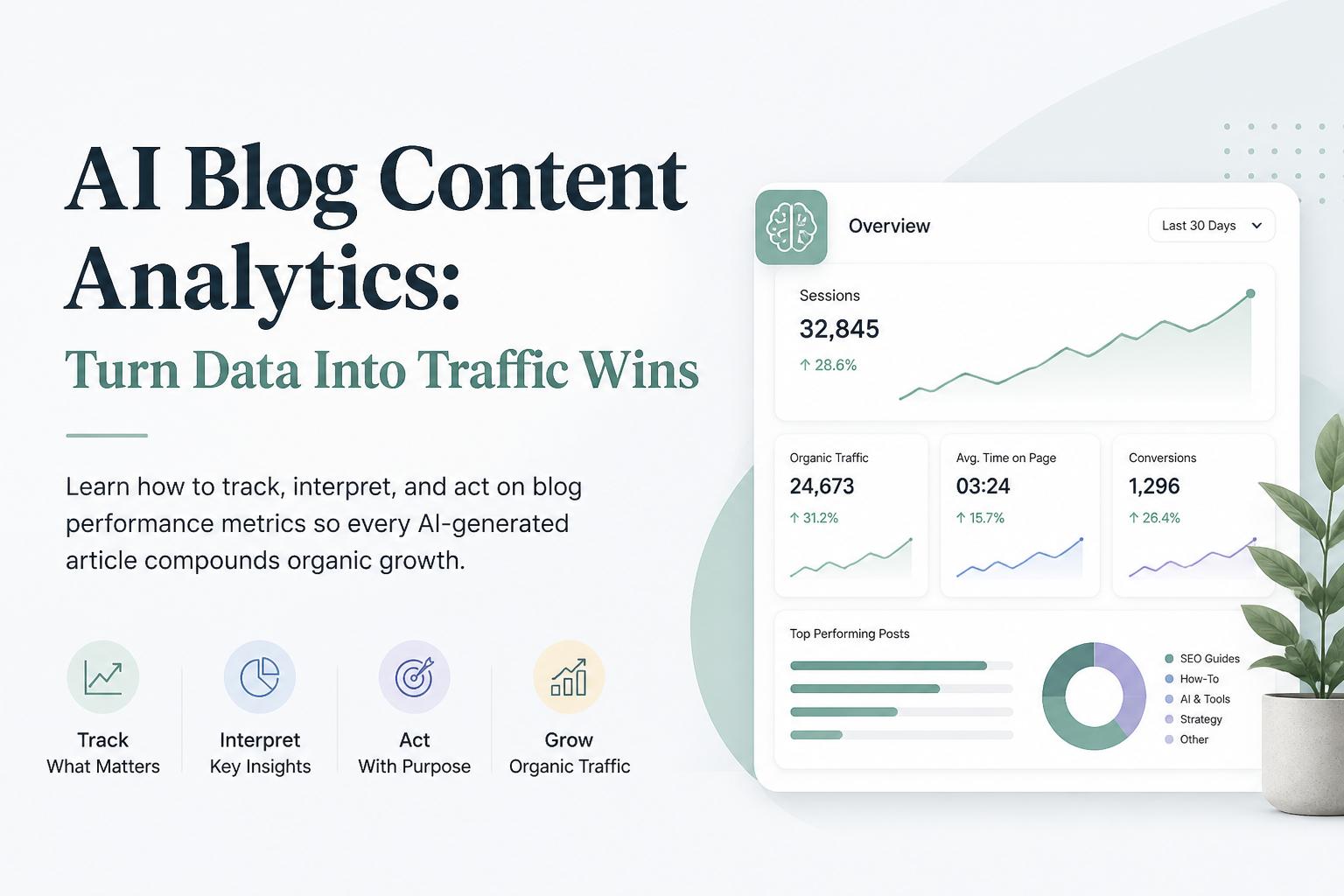
You’re publishing AI-generated articles, but traffic is flat and conversions are a mystery. You know content should compound, yet every post feels like a shot in the dark instead of a predictable growth lever.
This is exactly where AI blog analytics becomes your unfair advantage: when you can see what’s working, why it’s working, and what to publish next, every article becomes a calculated bet instead of a guess.
In this guide, you’ll learn how to set up a practical analytics stack, which blog KPIs actually matter, and how to turn data into specific content decisions that grow organic traffic and leads. We’ll also link out to resources on building a blog analytics dashboard that actually guides decisions and on measuring content attribution and revenue impact once you’re ready.
Everything here is written for teams using AI blogging platforms (like Supablog) that want to scale content without losing control of quality, SEO, or ROI.
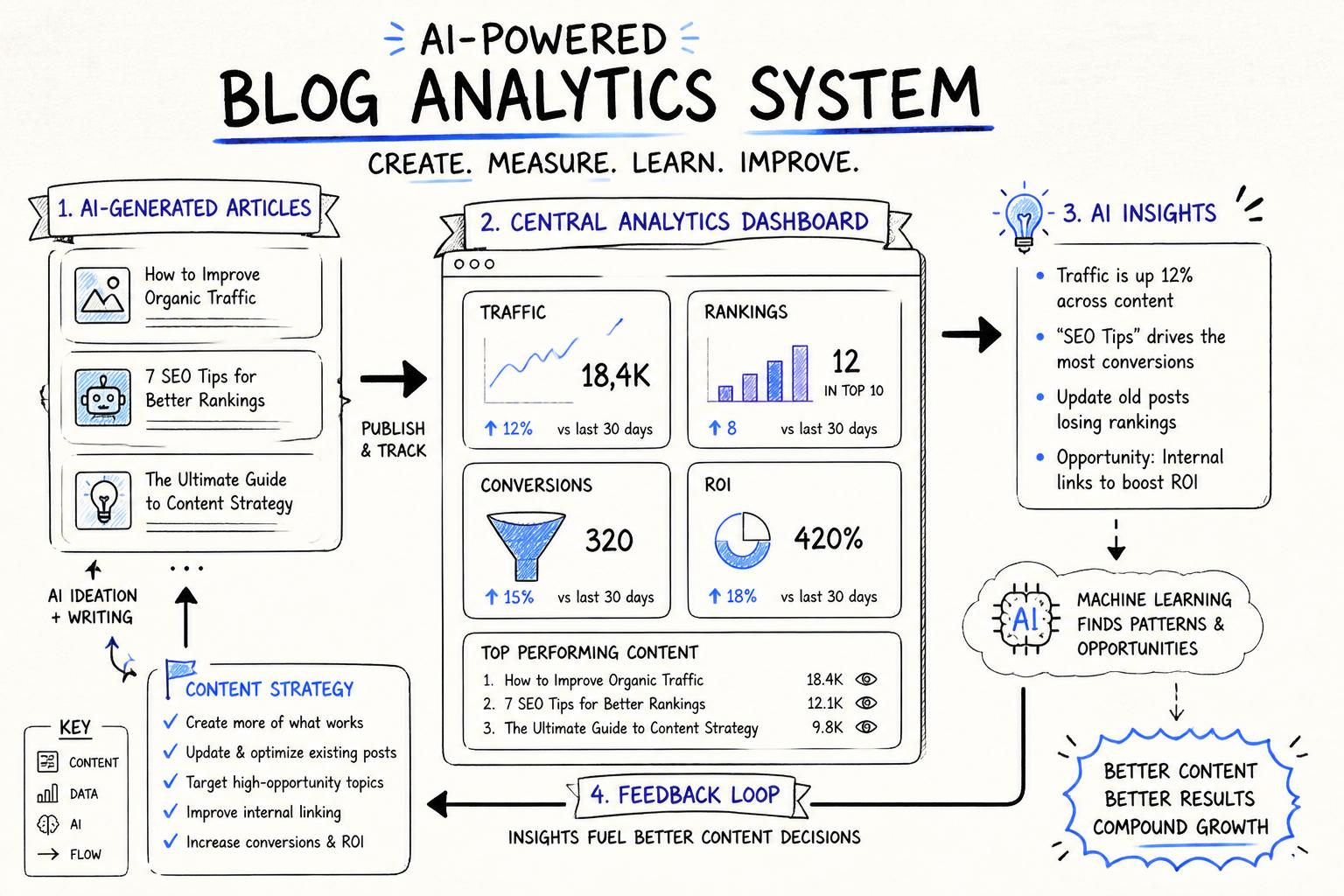
AI blog analytics is the practice of tracking, interpreting, and acting on data from your blog using AI-assisted tools and workflows. Instead of just counting pageviews, you connect SEO, engagement, and conversion metrics into one feedback loop that tells you:
Which AI-generated posts actually drive organic traffic and leads
What topics, formats, and angles resonate with your audience
Where your content is leaking readers (and how to fix it)
How to prioritize new articles and updates for maximum impact
This is especially important if you’re producing content at scale with an AI blogging platform like Supablog. When you ship 20–30 posts a month, guessing is expensive. Analytics is how you make sure volume turns into predictable growth, not noise.
Traditional analytics tools (Google Analytics, Search Console, etc.) are great at collecting data but bad at telling you what to do. AI blog analytics layers intelligence on top of that raw data to:
Spot patterns humans miss (e.g., topics that consistently convert above average)
Cluster queries and pages into themes instead of isolated keywords
Suggest specific optimizations (new sections, internal links, FAQs)
Forecast impact of publishing or updating certain posts
The result: less time digging through dashboards, more time executing on clear content opportunities.
Before diving into tools and metrics, it helps to have a simple mental model. A useful AI blog analytics framework has four stages:
Collect: Capture the right data from your blog, SEO tools, and CRM
Interpret: Use AI and simple models to turn data into insights
Decide: Prioritize actions (publish, update, promote) based on impact
Act: Implement changes and measure results in short feedback loops
Everything else—dashboards, reports, tools—is there to support these four steps.
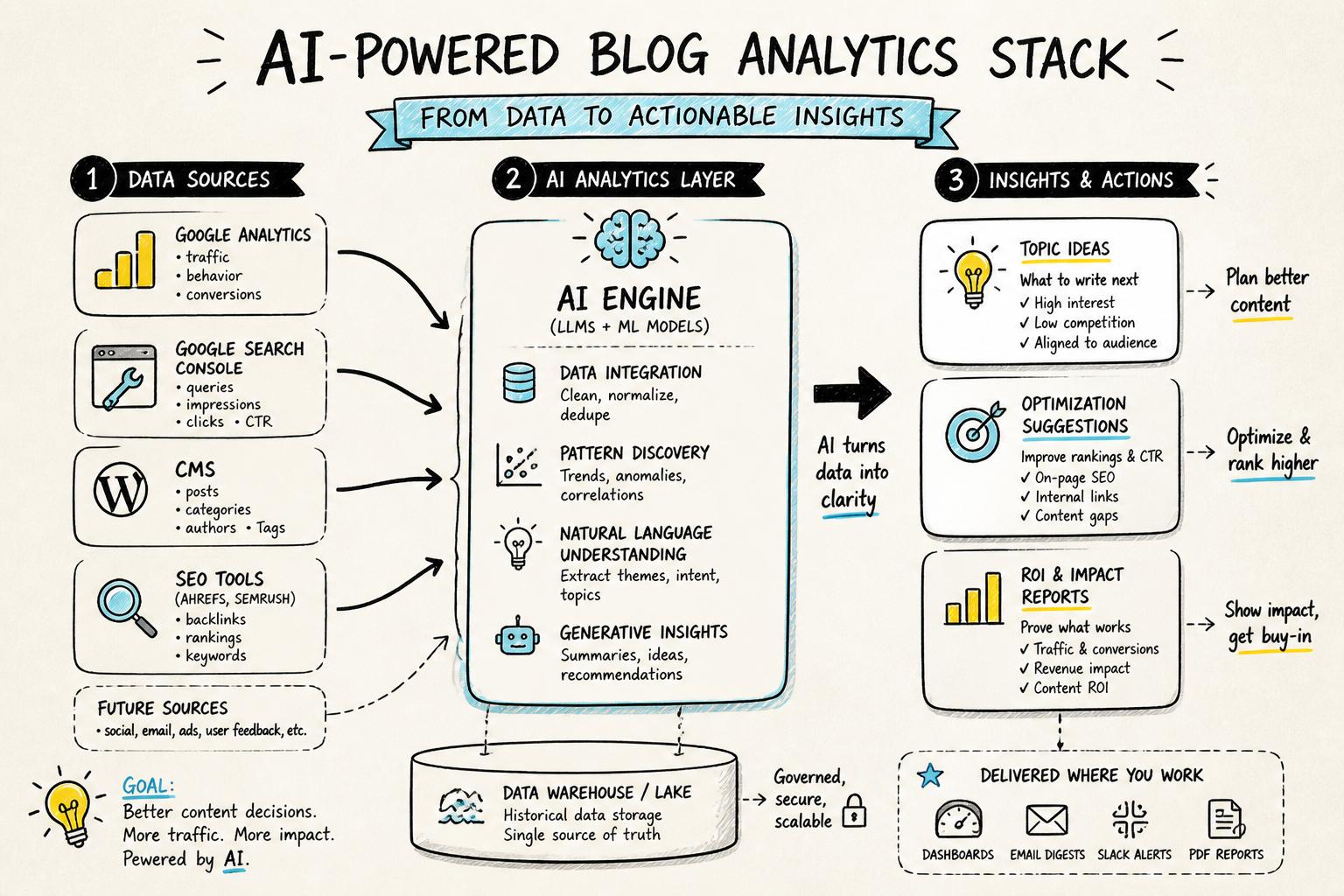
You don’t need an enterprise data warehouse to get value from AI blog analytics. You need a minimal, reliable stack that covers traffic, SEO, behavior, and conversions.
Web analytics: Google Analytics 4 (GA4) or a privacy-focused alternative like Plausible or Fathom
Search performance: Google Search Console for queries, impressions, and rankings
SEO tooling: Ahrefs, Semrush, or similar for keyword and competitor data
CMS / blog platform: WordPress, Webflow, Shopify, Framer, or an AI blogging platform like Supablog
CRM / marketing automation (optional but powerful): HubSpot, Salesforce, or similar for tying content to pipeline
If you haven’t yet, follow our step-by-step guide to build a blog analytics dashboard that actually guides content decisions. It shows how to connect these sources into one view.
Before you obsess over content marketing metrics, make sure your tracking isn’t lying to you. Prioritize:
Clean URL structure: Consistent slugs and canonical URLs so sessions and rankings aren’t split
Basic event tracking: Scroll depth, time on page, CTA clicks, form submissions
UTM tagging: For campaigns promoting your blog (email, paid, social)
Goals / conversions: Newsletter signups, demo requests, trials, purchases
Google provides detailed documentation on configuring events and conversions in GA4, which is a good baseline even if you later use additional tools.
One of the biggest mistakes teams make with blog performance analytics is tracking too much and acting on too little. Focus on a small set of leading and lagging indicators that map to your funnel.
Organic sessions: How many search-driven visits your blog attracts
New users: Share of traffic from first-time visitors
Impressions and average position: From Search Console, to see visibility growth before clicks
Engaged sessions / time on page: Are visitors actually reading?
Scroll depth: How far readers get through your content
Newsletter signups from blog: Your primary soft conversion
Lead / trial / demo form submissions: Hard conversions influenced by content
Assisted conversions: Conversions where a blog post was part of the customer journey
Pipeline and revenue influenced by content: Using simple content attribution models for blogs
For a deeper dive into turning existing traffic into leads, we break down specific tweaks in our guide on improving blog conversion rate for AI-generated posts.
Beyond direct conversions, a few health metrics indicate whether your AI content engine is compounding:
Number of ranking pages: How many posts get any impressions/clicks
Share of non-branded traffic: Percentage of organic traffic from generic queries, not brand name
Backlinks to blog posts: Especially from high-authority domains
Content freshness: Share of traffic coming from posts updated in the last 6–12 months
With KPIs defined, the next step is building a dashboard that surfaces them in one place. You can do this in Looker Studio, Notion, Sheets, or inside a content platform that includes blog performance analytics out of the box.
An effective dashboard should answer, at a glance:
Is organic traffic trending up, flat, or down?
Which posts bring the most traffic, and which bring the most conversions?
Which topics or clusters are working best?
Where are there quick wins from updating or expanding existing posts?
Design your dashboard around questions, not charts. For example:
Question: “What should we update this month?”
View: Posts with high impressions but low CTR, or high traffic but low conversions
Question: “Which topics deserve more content?”
View: Topic clusters with strong conversion rates or fast traffic growth
Question: “Is our AI content quality high enough?”
View: Engagement metrics (engaged sessions, scroll depth) by content type or author
We walk through a practical setup in our guide on how to build a blog analytics dashboard that actually guides content decisions.
AI can help summarize and interpret your dashboard data. A few examples:
Generate weekly summaries like “Top 5 posts by new leads” or “3 posts with fastest ranking gains”
Cluster search queries into topics to spot emerging themes
Flag anomalies (sudden drops or spikes) for human review
Suggest candidate posts for refreshes or internal linking
Supablog, for instance, pairs AI-generated, SEO-optimized blog posts with built-in performance analytics so you can see, post by post, how your AI content is performing and where to iterate.
Once data is flowing and visualized, the real leverage of AI blog analytics is in interpretation. Here’s how to turn raw metrics into insights.
Feed your top-performing posts (by traffic, conversions, or both) into an AI assistant and ask it to analyze:
Common structures (length, headings, use of examples, FAQs)
Search intent (informational, commercial, transactional)
On-page SEO elements (title format, meta descriptions, internal links)
Topic angles (e.g., “how-to”, “frameworks”, “mistakes”, “benchmarks”)
Use this to create a “winning post blueprint” that your AI blog writer follows by default.
For posts with impressions but low clicks or engagement, AI can help you triage issues quickly. Provide metrics like:
Impressions vs. clicks (from Search Console)
Average position for main keywords
Engaged sessions, time on page, bounce rate
Conversion rate for key CTAs
Then prompt the AI to suggest specific hypotheses: weak title, mismatched intent, thin content, lack of examples, missing FAQs, slow page speed, etc. This turns a vague “this post isn’t working” into a prioritized optimization checklist.
Instead of looking at keywords one by one, export your ranking queries and feed them into an AI model to:
Group queries into topics and subtopics
Map which topics already have strong coverage
Highlight related queries where you have impressions but no dedicated content
This is how you move from “we target 50 keywords” to “we own the entire topic of AI blog analytics, from dashboards to attribution to conversion optimization.”
Analytics only pays off when it shapes your editorial calendar. A simple, repeatable process is:
Review: Weekly or biweekly review of your dashboard
Decide: Choose a small number of actions (e.g., 3 new posts, 5 updates)
Brief: Turn each action into a clear content brief
Produce: Use your AI blogging platform to draft, then human-edit for quality
Measure: Track the impact over the next 4–12 weeks
Use your AI blog analytics data to score opportunities by impact and effort:
High-impact, low-effort: Update posts ranking 5–15 for valuable keywords; add missing sections, FAQs, and internal links
High-impact, medium-effort: Create new posts targeting topics where you already have some authority (supporting keywords, backlinks)
Medium-impact, low-effort: Improve CTAs and page layout on posts with strong traffic but weak conversions
Low-impact, high-effort: Brand-new topics where you have no authority yet—do these sparingly
Our guide on improving blog conversion rates for AI-generated posts walks through specific on-page tweaks (CTAs, layouts, in-line offers) to make the most of existing traffic before you chase new keywords.
Eventually, leadership will ask: “What revenue is our AI content actually driving?” You don’t need a perfect answer; you need a consistent, honest model.
Last-touch attribution: Credit the last blog post viewed before a conversion
First-touch attribution: Credit the first blog post in a converting user’s journey
Assisted attribution: Count any blog touchpoint in the path and share credit
We break down practical content attribution models for blogs, including how to implement them with simple tools instead of a full-blown data team.
For ROI, combine:
Value per lead or signup: From your sales/finance team
Number of leads or signups influenced by blog content
Content costs: Tooling (e.g., Supablog), editing, design, promotion
Then calculate a simple ratio: content-influenced revenue / content costs. It won’t be perfect, but it will trend in the right direction as your AI content engine matures.
Even sophisticated teams fall into a few predictable traps when they start measuring blog performance.
Pageviews and follower counts feel good but don’t always correlate with pipeline. Anchor your reporting around leading indicators of revenue: non-branded organic traffic, qualified leads, and assisted conversions.
SEO is noisy. Rankings and traffic bounce around daily. Focus on 4–12 week trends, not week-over-week fluctuations, especially for newer posts. Google’s own documentation on how search works and ranking volatility is a useful reference here.
Numbers alone can’t tell you if your AI-generated content is genuinely helpful. Layer in:
Comments and replies from readers or customers
Sales team feedback on which posts help close deals
Support tickets that reference specific articles
These qualitative signals are powerful inputs when you ask AI to suggest new topics or angles.
If your AI blog writer never “sees” performance data, it can’t improve. Use insights from your analytics to update your AI prompts, templates, and guardrails:
Feed winning posts into the AI as style and structure examples
Update prompt instructions based on what boosts engagement and conversions
Set minimum standards (e.g., FAQs, internal links, examples) based on high-performing content
Supablog is an AI-powered blogging platform built for teams that want to scale SEO content without losing control of performance. It combines:
AI content generation: High-quality, SEO-optimized blog posts with automatic keyword research
Multi-platform publishing: Push to WordPress, Webflow, Shopify, Framer, and more from one place
AI image generation: On-brand visuals for each article
Blog performance analytics: See which posts drive traffic, rankings, and conversions
Backlink automation: High-DR backlinks via automated exchange to strengthen rankings
Because analytics is built into the same platform you use to generate and publish, it’s easier to close the loop: identify winning patterns, update prompts, and prioritize which posts to write or refresh next.
If you want to move from “we publish and hope” to “we publish and measure,” here’s a simple 30-day rollout:
Audit your current tracking (events, goals, URL structure)
Define your primary blog KPIs for TOFU and conversions
Connect GA4, Search Console, and your CMS or Supablog
Build a basic blog analytics dashboard focused on decisions
Establish baselines for traffic, rankings, and conversions
List your top 10 posts by traffic and by conversions
Use AI to analyze your top and bottom performers for patterns
Cluster your queries into topics and identify gaps
Create a 4–6 week content roadmap (new posts + updates)
Publish or update content based on your roadmap using your AI blog writer
Instrument additional events if needed (e.g., new CTAs)
Document early results and refine your prompts and templates
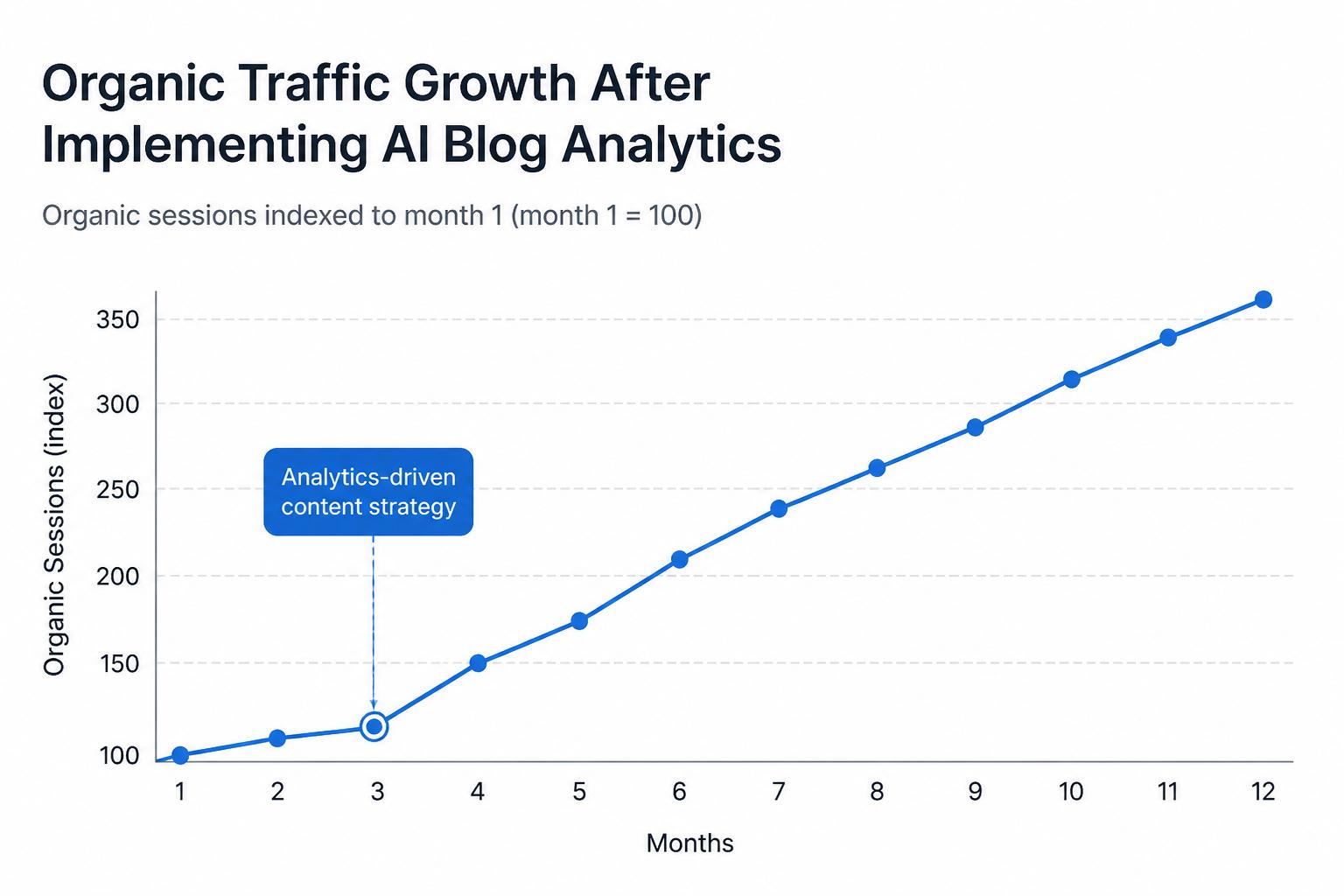
If you maintain this loop—publish, measure, learn, adjust—your AI content operation will compound. Traffic will grow more predictably, conversions will rise without requiring more volume, and you’ll have the data to prove that your blog is a true growth channel, not a cost center.
When you’re ready to operationalize this end to end, Supablog’s AI content generation, SEO optimization, and built-in blog analytics give you a single place to plan, create, and measure every article.
Written by
Pranjal JainFounder of Supablog, Pranjal is a software engineer passionate about building SaaS products that empower founders to grow and scale their businesses. With a strong focus on practical innovation, he creates tools that solve real-world challenges in the SaaS ecosystem. Outside of building and writing, he enjoys reading and traveling, drawing inspiration from new ideas, cultures, and experiences.