Content Workflow Automation With AI Tools: From Brief to Publish
Design an end-to-end automated workflow that takes you from SEO brief to live blog post with minimal manual work.

Design an end-to-end automated workflow that takes you from SEO brief to live blog post with minimal manual work.
Pranjal Jain
Every content team eventually hits the same wall: you know what you should publish, but your process is too slow and manual to keep up. Briefs live in docs, drafts get lost in email, SEO checks happen at the last minute, and publishing is a copy-paste marathon.
Content workflow automation fixes this by turning your entire process into a predictable system: from SEO brief to live article, with AI doing most of the heavy lifting and humans focusing on strategy and quality. In this tutorial, you’ll design an end-to-end content workflow automation setup you can actually implement.
We’ll walk through each stage of an AI content workflow, the tools and automations to use, and where a platform like Supablog can centralize and simplify the whole thing. If you’re already thinking about AI content marketing, read this alongside our complete guide to AI content marketing for organic growth to connect the strategy with the execution.
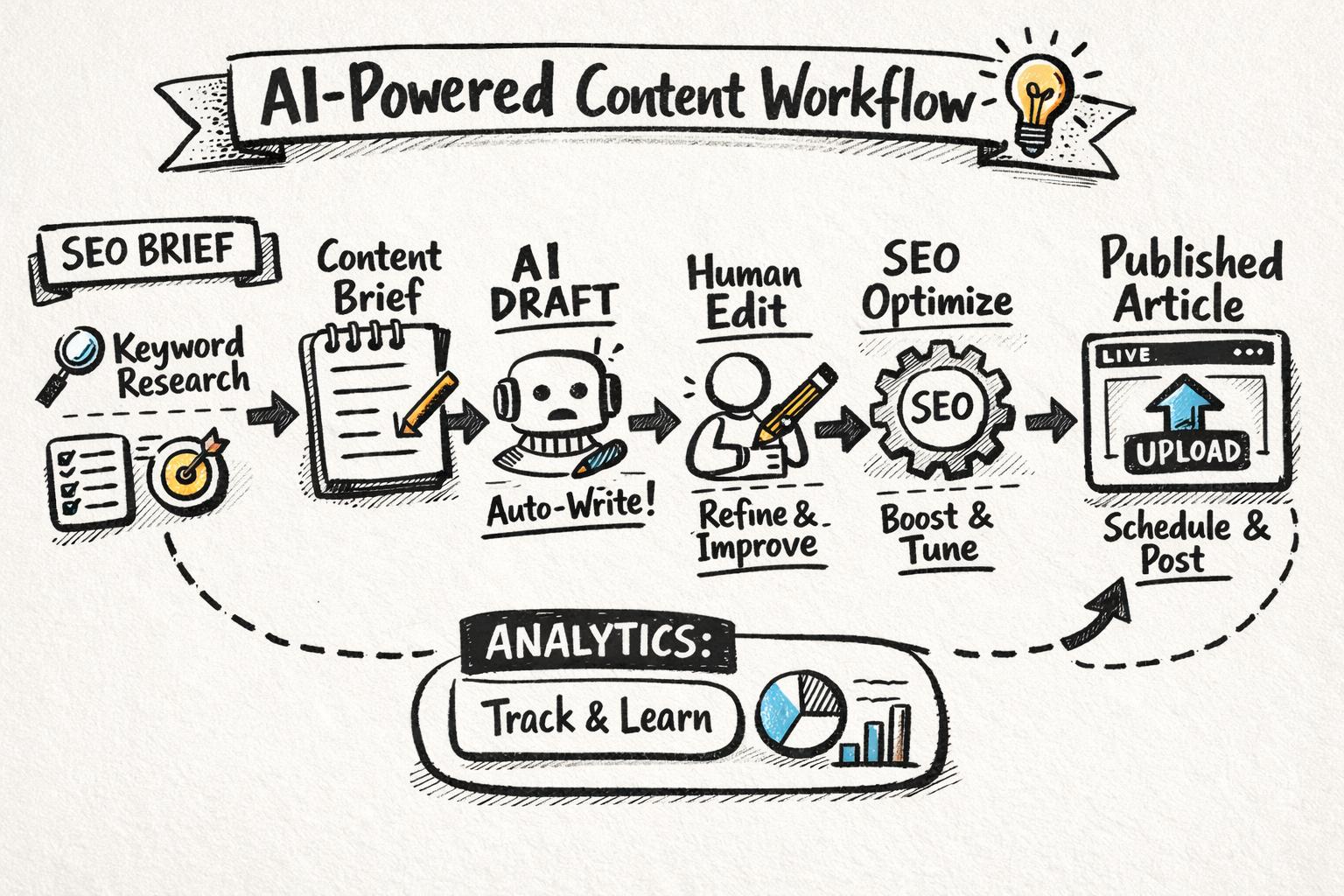
Content workflow automation is the practice of using software and AI to move content through a standardized process—ideation, research, drafting, editing, SEO, approval, and publishing—with minimal manual handoffs.
Instead of managing tasks in email and spreadsheets, you design a system where:
Work moves automatically from one stage to the next
AI handles repetitive steps (drafting, rewriting, formatting, basic SEO)
Humans review, refine, and make strategic decisions
Publishing and distribution happen with one click—or fully automatically
It’s not about “set and forget” content spam. It’s about building a reliable, measurable ai content workflow that lets you ship more high-quality articles with the same (or smaller) team.
If you’re at the MOFU stage, you already know content works—you just need more of it, without burning out your team. Here’s what a well-designed content workflow automation can unlock.
Most teams spend the majority of their time on low-leverage tasks: formatting, image sourcing, internal linking, CMS admin, and repetitive rewrites. Automation shifts that balance.
AI drafts first versions based on your brief
Templates standardize structure and on-page SEO
Auto-publishing pushes approved content to your CMS
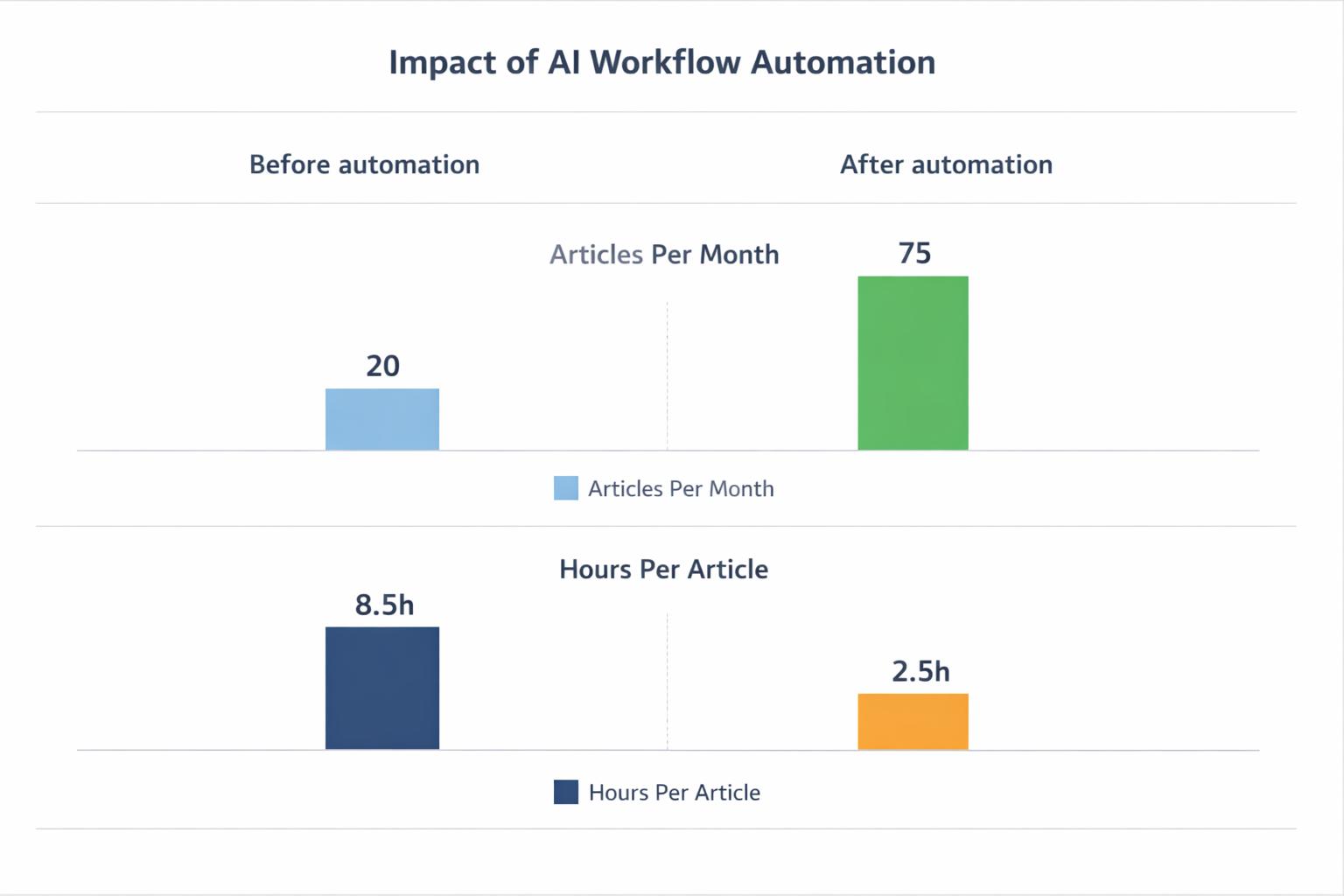
Teams using AI-assisted workflows routinely report 2–5x faster production cycles according to multiple content marketing benchmarks.
Manual workflows are fragile. If one person forgets to add internal links or meta descriptions, your SEO suffers. Automation bakes best practices into the process.
Every post gets a keyword-mapped brief
On-page SEO checks run automatically before publish
Internal links and schema can be suggested or auto-inserted
To make this work at scale, you’ll want a repeatable SEO content brief template for AI writers that your tools and teammates follow every time.
When your workflow is standardized and instrumented, measuring ROI becomes much easier. You can track:
Time from idea to publish
Cost per article (including tool costs)
Traffic, leads, and revenue per article or topic cluster
That makes it possible to connect your AI-driven workflow to business outcomes, as we break down in detail in how to measure the ROI of AI content marketing.
Before you automate anything, map your current process. Then design your ideal AI-powered version. For most teams, a modern ai blogging workflow has these stages:
Research and topic selection
SEO content brief creation
AI-assisted drafting
Human editing and subject-matter review
On-page SEO optimization
Design, images, and embeds
Approval and publishing
Promotion and internal linking
Performance tracking and updates
Now let’s turn this into an automated pipeline, step by step.
Everything starts with the right topics. Instead of ad-hoc keyword research, build a system that continuously surfaces opportunities and feeds your content calendar.
Keyword discovery for your core themes
Clustering keywords into topics and subtopics
Basic difficulty and intent analysis
Drafting working titles and outlines
Supablog includes automatic keyword research that continuously finds relevant terms for your niche and groups them into topics. From there, you can generate SEO-optimized article ideas in one click, which flow directly into your production queue.
If you prefer a more manual approach, pair your SEO tool of choice with an AI assistant to cluster and prioritize keywords. For example, export keywords from Ahrefs or Semrush and use AI to group them by intent and funnel stage.
Define 3–5 core themes that align with your product and audience
Commit to a target publishing cadence (e.g., 8–12 posts per month)
Use a calendar template like our AI blog content calendar to connect topics to dates and owners
The brief is where strategy lives. If you skip it or improvise, your AI output will be hit-or-miss. Automating content starts with standardizing the brief format, then partially automating how briefs are generated.
Primary and secondary keywords (with search intent)
Target audience and funnel stage
Searcher problem and desired outcome
Outline with H2/H3 structure
Internal links to include (pillars and clusters)
Competitive notes (what to do better/differently)
You can use AI to generate a first-pass brief, then have a strategist refine it. Our SEO content brief template gives you a plug-and-play structure you can reuse across tools.
In Supablog, you can go from keyword to SEO-aware brief to full article in a few steps. The platform bakes in best practices like clear headings, meta data, and internal linking opportunities, so your brief automatically informs the generated draft.
This is where automation starts to pay off. Instead of asking writers to draft from scratch, use an AI article generator to create a structured, SEO-conscious first draft based on your brief.
Respects your outline and headings
Uses the right keywords naturally, not stuffed
Matches your tone of voice (professional, conversational, technical, etc.)
Includes examples, comparisons, and clear explanations—not just fluff
Supablog is built specifically for SEO-optimized blog content. You feed it your topic and key inputs, and it generates long-form articles that are structured for rankings and readability. You can also create content in 150+ languages or ask for unlimited rewrites if you want a different angle.
AI can generate a lot of words very quickly—but that doesn’t guarantee quality. Implement guardrails like:
A human editor reviewing every article
A checklist to catch SEO gaps, factual errors, and brand voice issues
Minimum standards for examples, data, and originality
We recommend running each AI draft through a process like the one in our AI blog post checklist before it’s considered ready to publish.
No matter how advanced your AI tools are, humans should still own quality. The key is to make the review layer focused and efficient, not a bottleneck.
Content editor: fixes structure, clarity, and flow; ensures the article answers the searcher’s question
Subject-matter expert (SME): reviews for accuracy, adds real examples, and contributes quotes
SEO specialist: validates keyword use, internal links, and meta data
In smaller teams, one person may wear all three hats. The important part is that the responsibilities are explicit and mapped into your workflow.
Use your project management tool or your content platform to automatically:
Assign an editor when a draft is ready
Notify SMEs when their review is needed
Move articles to “Ready to publish” when all checks are complete
With Supablog, much of this happens inside one environment, so you’re not jumping between docs, email, and your CMS.
On-page SEO is where many teams lose time: checking headings, meta tags, alt text, and internal links by hand. This is ideal territory for marketing automation for content.
Meta titles and descriptions: AI can draft optimized versions based on your target keyword and brand voice
URL slugs: standardized, keyword-rich slugs generated from the title
Internal links: suggestions for relevant pillar and cluster content
Image alt text: auto-generated, descriptive alt tags
Schema markup: article schema and FAQ schema where relevant
Supablog includes built-in SEO optimization with keyword suggestions and best practices, so many of these checks are handled automatically as part of the drafting and publishing flow.
If you’re using a separate CMS, you can also lean on plugins and tools that perform SEO audits and recommend fixes before you hit publish. Just make sure these checks are baked into your workflow, not treated as an optional extra.
Visuals are often an afterthought—but they’re also time-consuming. Sourcing stock images, designing diagrams, and embedding videos can easily add 30–60 minutes per article if done manually.
AI-generated images that match your article’s topic and style
Automatic YouTube embeds for relevant videos
Consistent formatting for headings, lists, quotes, and code blocks
Supablog can generate AI images in different styles and automatically embed relevant YouTube videos into your posts, so your articles look polished without design support.
Ensure all images have descriptive alt text (which AI can draft and editors can refine)
Use headings and lists to make content scannable
Keep embeds relevant and avoid slowing down page load with unnecessary media
This is where content workflow automation becomes very tangible: you move from “copy-paste into CMS and fix formatting” to “approve and auto-publish.”
Direct publishing: Approved articles are pushed from your content platform straight to your CMS (WordPress, Webflow, Shopify, Framer, etc.)
Scheduled publishing: Set a date and time; the article goes live automatically
Multi-site publishing: One article syndicated to multiple properties with consistent formatting
Supablog is designed as an AI blogging platform with multi-platform publishing. You can generate, optimize, and publish SEO-focused content directly to your site without touching the CMS interface.
If you’re not using a dedicated platform, you can still automate parts of this via your CMS API and tools like Zapier or Make—but you’ll spend more time maintaining these integrations.
Publishing is only half the job. Your automated workflow should also trigger basic promotion and internal linking tasks so articles don’t just sit quietly in your blog archive.
Drafting social posts (LinkedIn, X, etc.) based on the article
Notifying sales or success teams about new content they can share
Adding new posts to relevant nurture sequences or resource hubs
While Supablog focuses primarily on the blog side, its consistent formatting and SEO structure make it easier to repurpose articles into other formats using your preferred AI tools.
Internal links are one of the highest-ROI, lowest-cost SEO levers, yet they’re often neglected. You can:
Use AI to suggest internal links from new articles to existing pillars and clusters
Periodically run internal link audits and generate “link opportunity” tasks
Standardize anchor text patterns for important pages
Google’s own documentation on SEO best practices emphasizes the importance of clear internal linking structures—automation just makes it easier to maintain them at scale.
The final piece of a mature content workflow automation system is the feedback loop. Your workflow shouldn’t just push content out; it should also learn from what works.
Organic traffic and impressions per article (via Google Search Console)
Keyword rankings for your primary and secondary terms
Engagement metrics: time on page, scroll depth, bounce rate
Conversions: demo requests, signups, or assisted revenue
Supablog includes performance analytics for blog content, so you can see which articles and topics are driving results and prioritize updates accordingly.
Once your analytics are flowing, you can:
Automatically flag underperforming articles for refresh after a set period
Use AI to propose updates: new sections, better intros, stronger CTAs
Schedule rewrites or expansions directly into your content calendar
This closes the loop between creation and optimization, turning your blog into a living asset rather than a one-and-done project. For a deeper dive on tying this to revenue, revisit our guide on measuring AI content ROI.
Let’s put this all together into a concrete example stack for an AI-powered, automated blog workflow.
Strategy & research: SEO tool (for deeper research) + Supablog’s automatic keyword discovery
Planning: Editorial calendar built around our AI content calendar framework
Briefing: Standardized SEO briefs based on our SEO brief template
Drafting: Supablog’s AI blog writer generates full articles from briefs
Editing: Human editors refine drafts using a checklist like the one in our AI blog post checklist
SEO optimization: Supablog’s built-in SEO suggestions and structure
Design & media: Supablog’s AI image generation and YouTube integration
Publishing: Direct publishing to WordPress, Webflow, Shopify, Framer, and more
Analytics: Supablog performance analytics + Google Analytics + Search Console
If you’re not ready for an all-in-one platform, you can approximate this with a DIY stack:
SEO tool for research and tracking (Ahrefs, Semrush, or similar)
General-purpose AI model for drafting and rewriting
Docs or Notion for briefs and drafts
Project management tool for workflow (Asana, ClickUp, Jira)
Zapier/Make for connecting tools and automating handoffs
CMS plugins for SEO checks and schema
This gives you flexibility but also more moving parts to maintain. As your volume grows, consolidating into a purpose-built blog automation software like Supablog usually becomes more cost-effective.
Supablog is built specifically to turn your blog into a scalable, automated growth channel. Here’s how it maps to the workflow we’ve covered:
Automatic keyword research to continuously feed your topic pipeline
AI-generated, SEO-optimized articles tailored to your niche and audience
Built-in SEO best practices so every article is structured to rank
AI image generation and YouTube integration for richer, more engaging posts
Multi-platform publishing to WordPress, Webflow, Shopify, Framer, and more
Performance analytics to see which posts drive traffic and conversions
Automated backlink exchange to build authority and support rankings
Pricing is straightforward: a 14-day free trial, then $99/month for up to 30 AI-generated and auto-published articles, with unlimited users per organization. For most content teams, that’s a fraction of the cost of adding even a single part-time writer.
Automation is powerful, but there are real risks if you get the balance wrong. Watch out for these common mistakes.
Publishing AI drafts without human review is a fast way to damage your brand and run into quality issues. Google’s guidance on creating helpful content emphasizes expertise, experience, and trust—things AI can’t fully replicate on its own.
Without clear guidelines, different team members will configure AI tools differently, leading to inconsistent tone and messaging. Create a simple brand voice guide and standard prompts that everyone uses.
Just because you can publish 100 articles a month doesn’t mean you should. Tie your automated workflow to a clear content strategy and business goals, not just output targets.
Automating your content workflow isn’t about replacing your team—it’s about giving them leverage. When AI handles the repetitive parts of research, drafting, formatting, and publishing, your writers and strategists can focus on what actually moves the needle: insight, positioning, and quality.
If you’re serious about turning your blog into a scalable acquisition channel, an end-to-end content workflow automation system is no longer a nice-to-have—it’s table stakes. Supablog gives you a purpose-built foundation for that system, from keyword research to automated publishing and analytics.
Start by mapping your current process, then layer in automation where it’s most painful today. As you standardize briefs, drafts, and publishing, you’ll quickly feel the shift from manual chaos to a predictable, AI-powered content engine.
Written by
Pranjal JainFounder of Supablog, Pranjal is a software engineer passionate about building SaaS products that empower founders to grow and scale their businesses. With a strong focus on practical innovation, he creates tools that solve real-world challenges in the SaaS ecosystem. Outside of building and writing, he enjoys reading and traveling, drawing inspiration from new ideas, cultures, and experiences.